

webpimage
Free + ProFree WebP to JPG & PNG converter
Convert WebP images to JPG, PNG or WebP on Windows in one click – whole folders at once, 100% offline and private.
Paper sizes, DPI, pixels & screens
How big will this photo print? How many pixels does A3 need at 300 DPI? A free Windows tool for paper sizes, print resolution, screen PPI, aspect ratios and social media image sizes.
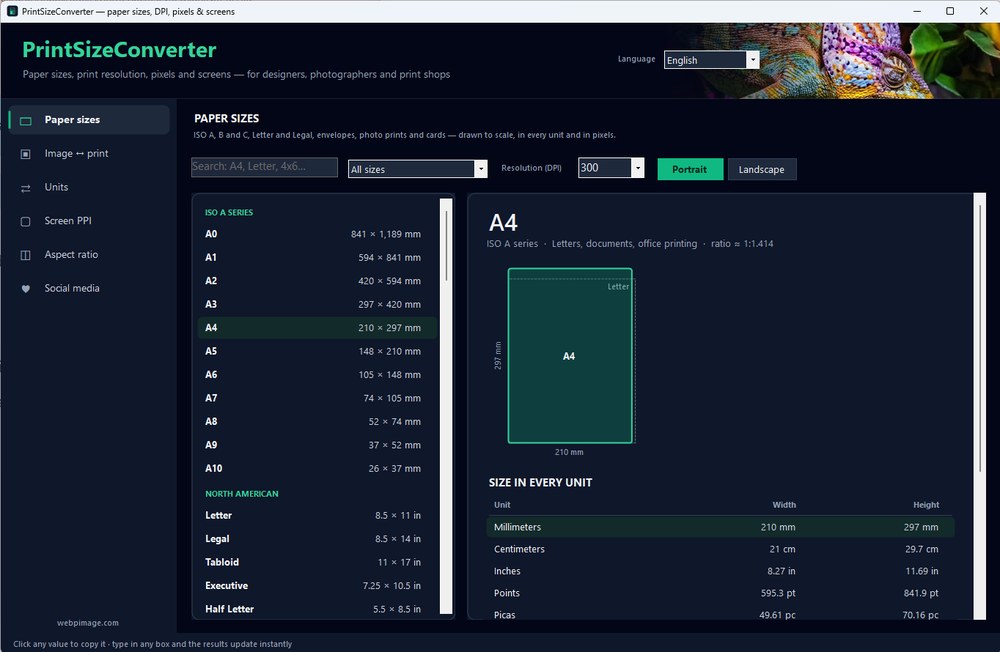
PrintSizeConverter answers the questions that come up every time you send something to print. Browse 90 paper, envelope, photo and card sizes – ISO A and B, US Letter and Legal, Arch, JIS and more – drawn to scale next to A4 and Letter, with the pixels each one needs at 72 to 600 DPI.
Enter an image's pixels to see how large it prints sharply, or a print size to see how many pixels you need, with a quality rating for each paper and viewing distance. Convert between millimeters, inches, points, picas and pixels in one place.
It also calculates a monitor's pixel density, finds aspect ratios and lists the recommended image sizes for every major social network. Click any value to copy it. Works offline.
Yes, PrintSizeConverter is completely free, with no time limit and no account.
Yes. PrintSizeConverter supports Windows 10, Windows 11.
Free WebP to JPG & PNG converter
Convert WebP images to JPG, PNG or WebP on Windows in one click – whole folders at once, 100% offline and private.
Color palettes, shade scales & contrast checks
Build color palettes and 50–950 shade scales, check WCAG contrast and preview color blindness – a free Windows app for designers and web builders.

Emoji keyboard for Windows – search in 44 languages
A free emoji keyboard that types emoji, special characters and kaomoji straight into any Windows app – with emoji search in 44 languages and a global shortcut.