
CryptoConverter
FreeLive crypto & currency converter
How many dollars is 1 Bitcoin right now? Convert between 400+ cryptocurrencies and 30+ currencies with live rates, and get a Windows alert when Bitcoin moves – a free Windows desktop app.

Emoji keyboard for Windows – search in 44 languages
A free emoji keyboard that types emoji, special characters and kaomoji straight into any Windows app – with emoji search in 44 languages and a global shortcut.
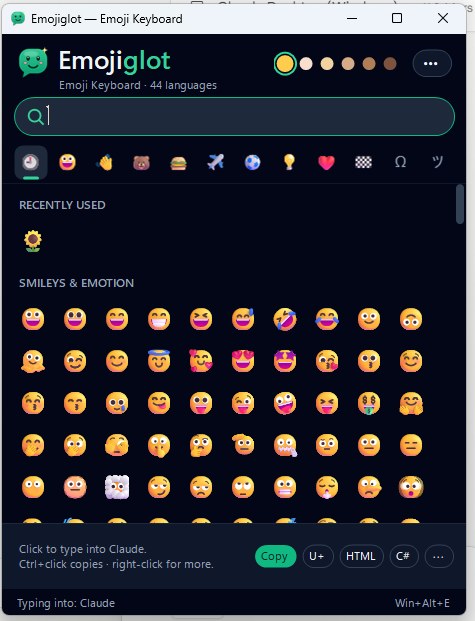
Emojiglot is an emoji keyboard for the Windows desktop. Click in Word, your browser, Visual Studio or any other app, then click an emoji: it is typed right there. The keyboard never steals the focus from the app you're working in.
Press Win+Alt+E from anywhere, type a word and press Enter – the first match is inserted instantly. Search works in 44 languages: "heart", "cœur", "corazón", "心" or "сердце" all find ❤️. Skin tones, recently used and the most popular emoji are one click away.
It also covers the characters that are hard to type: arrows, math symbols, fractions, currency signs, Greek and accented letters, box drawing, invisible characters such as the non-breaking space, and kaomoji ¯\_(ツ)_/¯. For developers, the bottom bar shows the code point and copies the character as U+1F600, an HTML entity, a C# or JavaScript escape, JSON, CSS, URL encoding or a shortcode.
Emoji are drawn in full color, and the app includes every emoji up to Unicode Emoji 17.0. It lives in the system tray, can stay on top and can start with Windows.
Yes, Emojiglot is completely free, with no time limit and no account.
Click where you want to type, press Win+Alt+E, type a word such as "smile" and press Enter. Or simply click an emoji in the keyboard window.
Yes. Emojiglot searches emoji names and keywords in 44 languages, based on Unicode CLDR data.
Yes. Emojiglot supports Windows 10, Windows 11.
Open Windows Settings > Apps > Installed apps, find Emojiglot and choose Uninstall.
Live crypto & currency converter
How many dollars is 1 Bitcoin right now? Convert between 400+ cryptocurrencies and 30+ currencies with live rates, and get a Windows alert when Bitcoin moves – a free Windows desktop app.
Turn PDFs into editable Word documents
Convert PDF files into editable Word (DOCX) documents in seconds, keeping the original formatting and layout – free for Windows.

Easter, Christmas and the church year – Western, Orthodox and Armenian
When is Easter this year, and when is Orthodox Easter? A free Windows app with every Christian holiday for any year, for the Western, Orthodox and Armenian churches.