
PaletteKit
FreeColor palettes, shade scales & contrast checks
Build color palettes and 50–950 shade scales, check WCAG contrast and preview color blindness – a free Windows app for designers and web builders.
Free WebP to JPG & PNG converter
Convert WebP images to JPG, PNG or WebP on Windows in one click – whole folders at once, 100% offline and private.
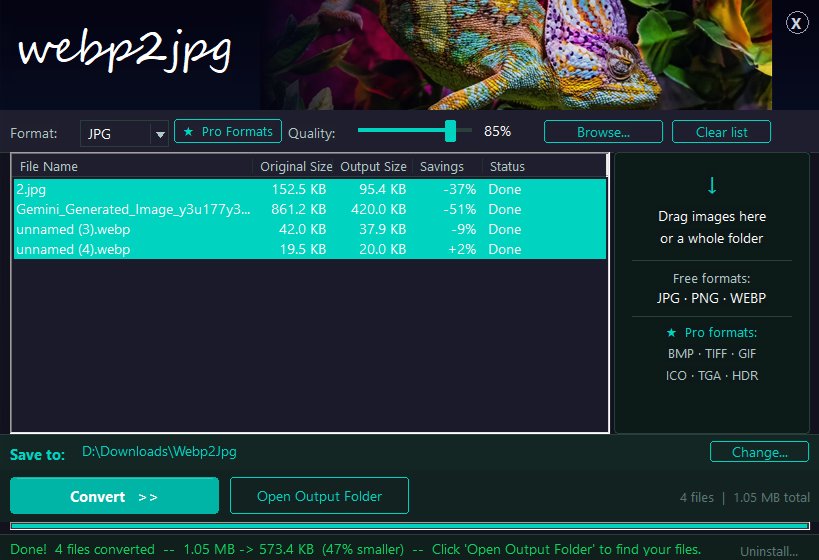
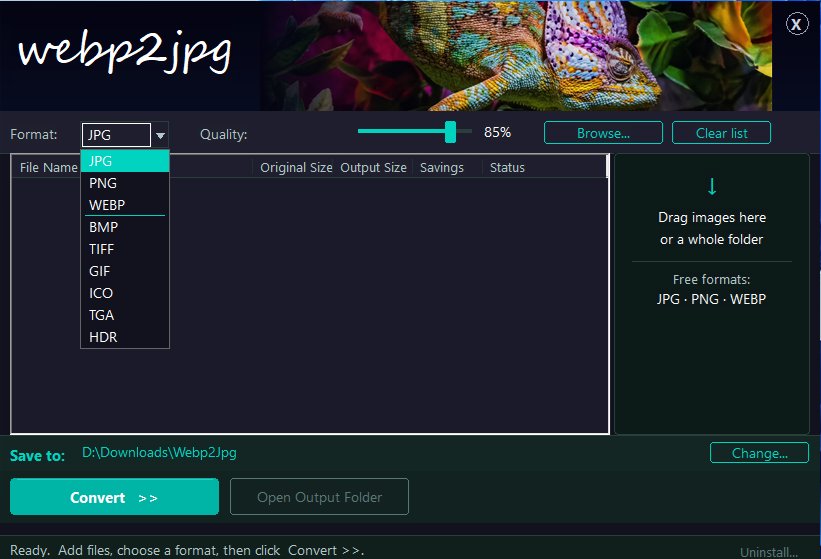
Browsers and websites save more and more pictures as WebP, but many programs still can't open them. webpimage converts them to JPG or PNG in seconds, right on your PC.
Drag in single images or an entire folder, choose the format and quality, and convert. Nothing is uploaded: every image is processed locally, so your photos stay private and conversion works without an internet connection.
The free version handles JPG, PNG and WebP with no limits on the number or size of files. The optional Pro upgrade adds six more formats for a single one-time payment.
$0
$9.99
Upgrade from inside the free version whenever you need it.
Yes, the free version of webpimage is free to use with no time limit. An optional Pro upgrade costs $9.99 (one-time payment).
No. Every image is converted locally on your PC; nothing is sent to a server, and it works offline.
Yes. Drop a folder into the window and every image in it is converted in one batch.
Yes. webpimage supports Windows 10, Windows 11.
Open Windows Settings > Apps > Installed apps, find webpimage and choose Uninstall.
Color palettes, shade scales & contrast checks
Build color palettes and 50–950 shade scales, check WCAG contrast and preview color blindness – a free Windows app for designers and web builders.

Emoji keyboard for Windows – search in 44 languages
A free emoji keyboard that types emoji, special characters and kaomoji straight into any Windows app – with emoji search in 44 languages and a global shortcut.

Easter, Christmas and the church year – Western, Orthodox and Armenian
When is Easter this year, and when is Orthodox Easter? A free Windows app with every Christian holiday for any year, for the Western, Orthodox and Armenian churches.