Every Jewish holiday with its dates, with a Hebrew date converter
Free
Windows 10, Windows 11
v1.0.0
When is Passover, Rosh Hashanah or Hanukkah this year? A free Windows app with every Jewish holiday for any year and a two-way Hebrew ↔ Gregorian date converter.
Screenshots
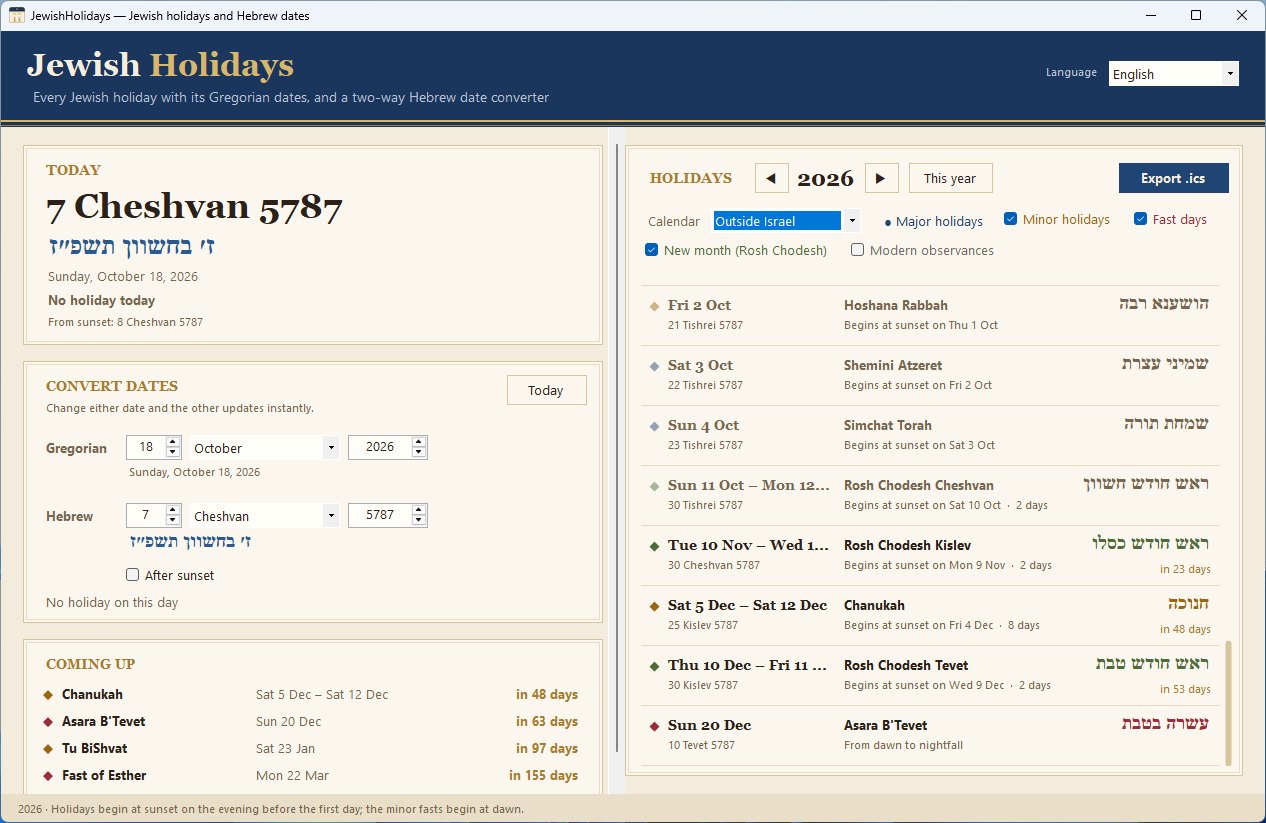
JewishHolidays: today's Hebrew date, the Hebrew date converter, coming holidays and the holidays of the year
Overview
JewishHolidays shows the Gregorian dates of Rosh Hashanah, Yom Kippur, Sukkot, Shemini Atzeret, Simchat Torah, Hanukkah, Tu BiShvat, Purim, Passover, Shavuot, Lag BaOmer, Tu B'Av, the fast days and Rosh Chodesh, for any year.
The Today card shows the Hebrew date, today's holidays and what begins at sunset. The converter turns any Gregorian date into a Hebrew date and back; "After sunset" gives the Hebrew date of the evening.
Each holiday shows the evening it begins, its Hebrew date and name, and how many days it lasts. Choose the two-day festival schedule used outside Israel or the one-day schedule of Israel; fast days moved because of Shabbat are shown on their actual date.
Export any year to Outlook, Google Calendar or Apple Calendar as an .ics file. Everything is calculated on your PC: no internet, no account, and no administrator rights to install.
Key features
Every Jewish holiday, the fast days and Rosh Chodesh
Two-way Hebrew ↔ Gregorian date converter
Each holiday begins at sunset – shown for every date
Two-day festivals or the one-day schedule
Fast days moved for Shabbat on their actual date
Hebrew dates and names
Countdown to the next holidays
Export to Outlook, Google Calendar and Apple Calendar (.ics)
11 languages
Works offline
Questions about JewishHolidays
Is JewishHolidays free?
Yes, JewishHolidays is completely free, with no time limit and no account.
Why does each Jewish holiday begin the evening before?
In the Hebrew calendar a day begins at sunset, so every holiday starts on the evening before its first daytime date. JewishHolidays shows that evening for every holiday.
Why do some festivals last one day longer in some communities?
Outside Israel, Passover, Shavuot and Sukkot traditionally have two festival days instead of one. You can choose either schedule in the app.
Does JewishHolidays need an internet connection?
No. All dates are calculated on your computer with the fixed Hebrew calendar.
Does JewishHolidays work on Windows 11?
Yes. JewishHolidays supports Windows 10, Windows 11.
How do I uninstall JewishHolidays?
Open Windows Settings > Apps > Installed apps, find JewishHolidays and choose Uninstall.
You may also like
ChristianHolidays
Free
Easter, Christmas and the church year – Western, Orthodox and Armenian
When is Easter this year, and when is Orthodox Easter? A free Windows app with every Christian holiday for any year, for the Western, Orthodox and Armenian churches.
Emoji keyboard for Windows – search in 44 languages
A free emoji keyboard that types emoji, special characters and kaomoji straight into any Windows app – with emoji search in 44 languages and a global shortcut.