Ramadan, Eid and every Islamic holiday, with a Hijri date converter
Free
Windows 10, Windows 11
v1.0.0
When does Ramadan start, and when is Eid? A free Windows app with every Islamic holiday for any year and a two-way Hijri ↔ Gregorian date converter.
Dates are calculated. Where months begin with the local sighting of the new moon, the actual day can differ by one or two days – use the adjustment setting to match your community.
Screenshots
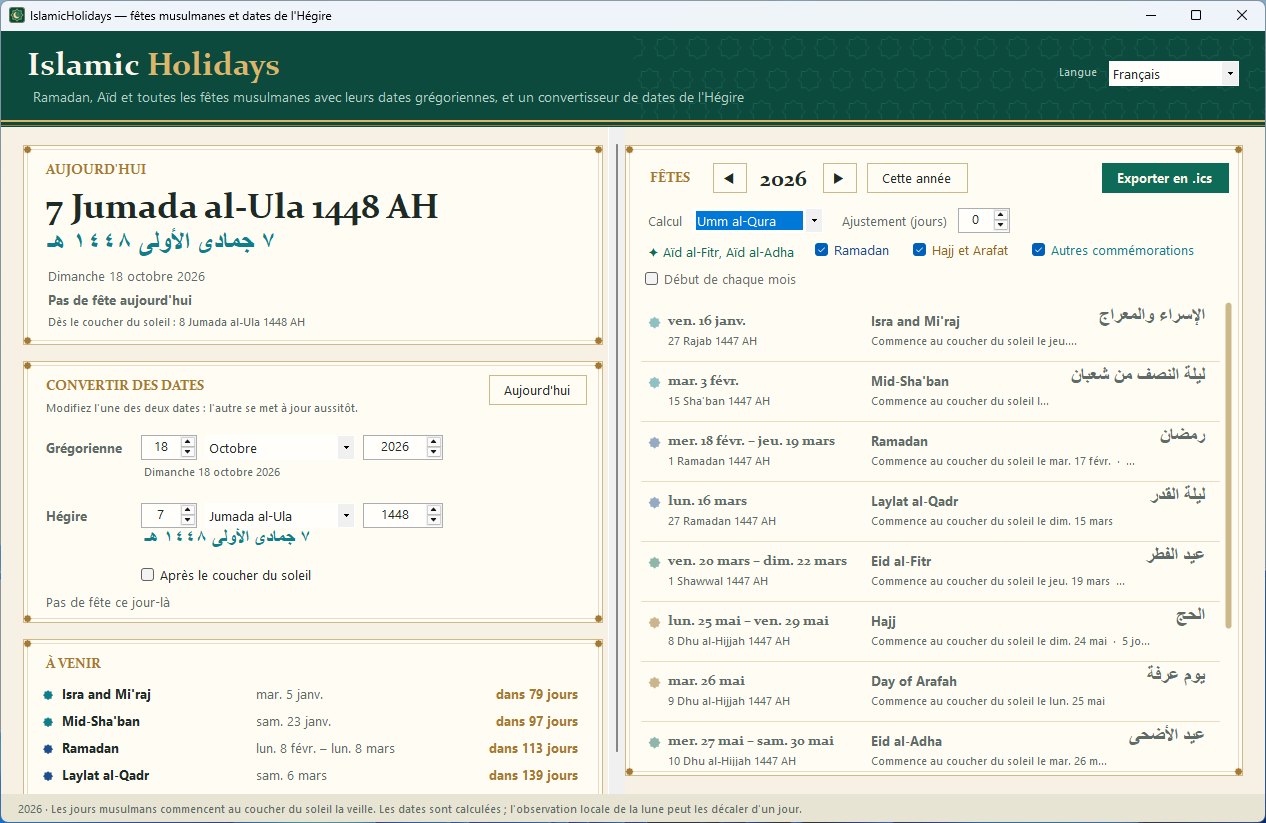
IslamicHolidays in French: today's Hijri date in Latin letters and Arabic, the Hijri date converter and the holidays of the year
Overview
IslamicHolidays shows the Gregorian dates of Ramadan, Eid al-Fitr, Eid al-Adha, the Day of Arafah, the days of Hajj, Islamic New Year, Ashura, Mawlid an-Nabi, Isra and Mi'raj, Mid-Sha'ban and Laylat al-Qadr, for any year.
The Today card shows the Hijri date in English and Arabic, today's holidays (for example "Ramadan, day 12 of 30") and what begins at sunset. The converter turns any Gregorian date into a Hijri date and back; "After sunset" gives the Hijri date of the evening.
Choose the Umm al-Qura calendar or the tabular Islamic calendar, and adjust dates by up to two days to follow local moon sighting. Every holiday shows the evening it begins and its Arabic name.
Export any year to Outlook, Google Calendar or Apple Calendar as an .ics file. Everything is calculated on your PC: no internet, no account, and no administrator rights to install.
Key features
Ramadan, Eid al-Fitr, Eid al-Adha and every Islamic holiday
Two-way Hijri ↔ Gregorian date converter
Umm al-Qura or tabular Islamic calendar
Moon-sighting adjustment of up to ±2 days
Each holiday begins at sunset – shown for every date
Hijri date in Arabic with Arabic-Indic digits
Countdown to the next holidays
Export to Outlook, Google Calendar and Apple Calendar (.ics)
14 languages, including Arabic, Urdu, Indonesian and Turkish
Works offline
Questions about IslamicHolidays
Is IslamicHolidays free?
Yes, IslamicHolidays is completely free, with no time limit and no account.
Why can the date of Eid differ from my mosque's announcement?
Many communities start each month when the new moon is sighted, which can be a day or two after the calculated date. IslamicHolidays lets you move every date by −2 to +2 days to follow your local sighting.
Which Islamic calendar does it use?
The Umm al-Qura calendar by default, or the tabular (arithmetic) Islamic calendar if you prefer.
Does IslamicHolidays need an internet connection?
No. All dates are calculated on your computer.
Does IslamicHolidays work on Windows 11?
Yes. IslamicHolidays supports Windows 10, Windows 11.
How do I uninstall IslamicHolidays?
Open Windows Settings > Apps > Installed apps, find IslamicHolidays and choose Uninstall.
You may also like
ChristianHolidays
Free
Easter, Christmas and the church year – Western, Orthodox and Armenian
When is Easter this year, and when is Orthodox Easter? A free Windows app with every Christian holiday for any year, for the Western, Orthodox and Armenian churches.
Every Jewish holiday with its dates, with a Hebrew date converter
When is Passover, Rosh Hashanah or Hanukkah this year? A free Windows app with every Jewish holiday for any year and a two-way Hebrew ↔ Gregorian date converter.
Emoji keyboard for Windows – search in 44 languages
A free emoji keyboard that types emoji, special characters and kaomoji straight into any Windows app – with emoji search in 44 languages and a global shortcut.